Placing Commodity Trades on Sahi: Order Ticket, Margin, Stop Loss & 1-Tap
Place a Gold Mini futures sell order and a Gold Mini put buy on SAHI: read the order ticket, choose product and order type, check margin or premium, and attach Stop Loss and Take Profit.
 8 minutes read|

Once you have decided what you want to trade, the order screen has a much simpler job: make sure the order you send is the order you intended to send.
That means checking the contract, direction, quantity, order type, capital required and the risk controls before the order goes through.
We will first place a Gold Mini Futures trade, then go through the same process with a Gold Mini Put.
Open The Futures Contract
Open Gold Mini on SAHI and select the Futures contract you want to trade.
In the screen shown here, the selected contract is:
Gold Mini 05 Nov Fut
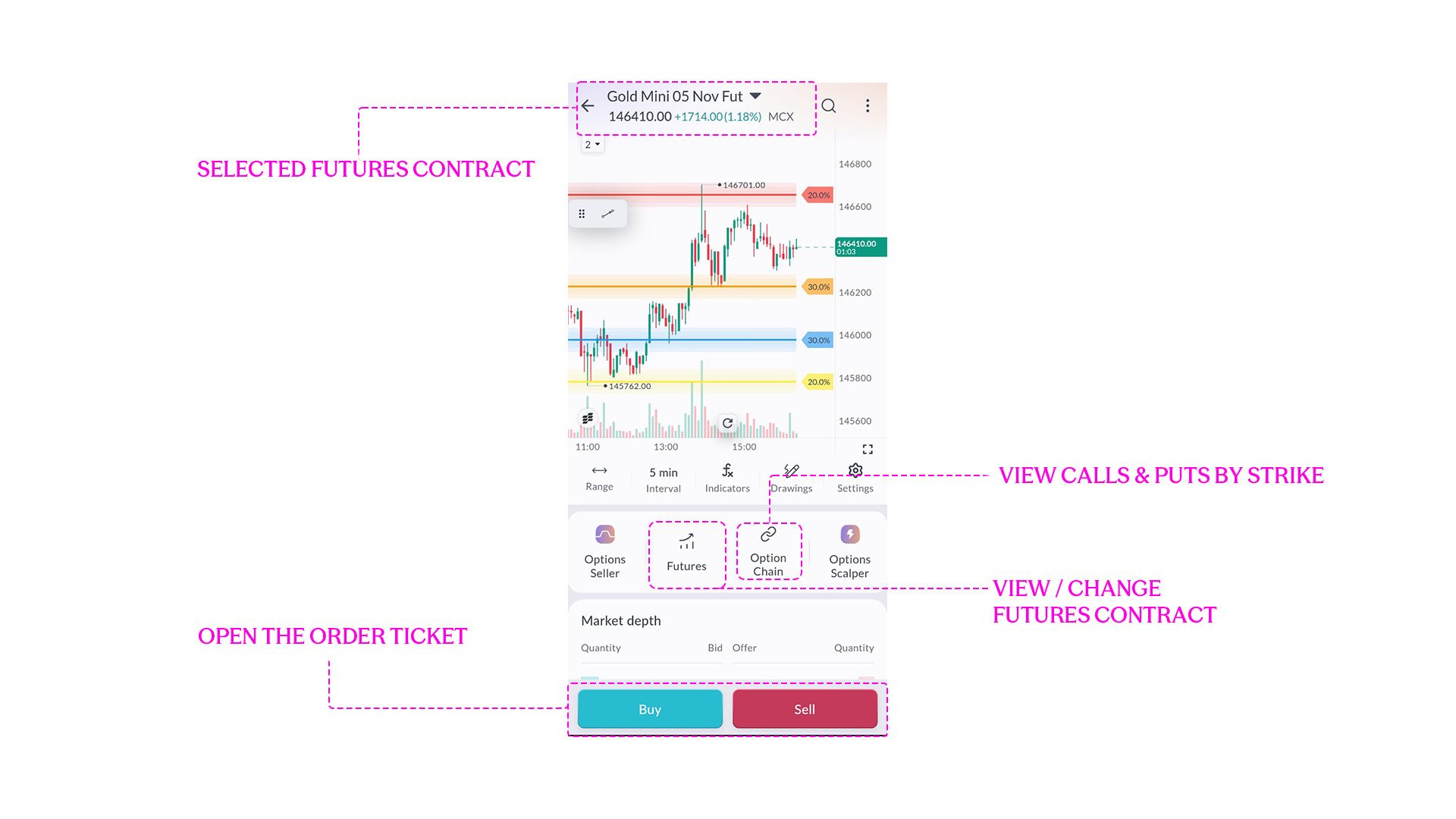
Check the contract name and expiry at the top before moving ahead. Gold Mini can have more than one Futures contract available, and an order placed in a different expiry is a different position.
From the same screen, you can also open the Futures list, move to the Option Chain, or use the Buy and Sell buttons to begin placing an order.
For this example, we will place a Sell order.
Read The Order Ticket
Tap Sell to open the order ticket.
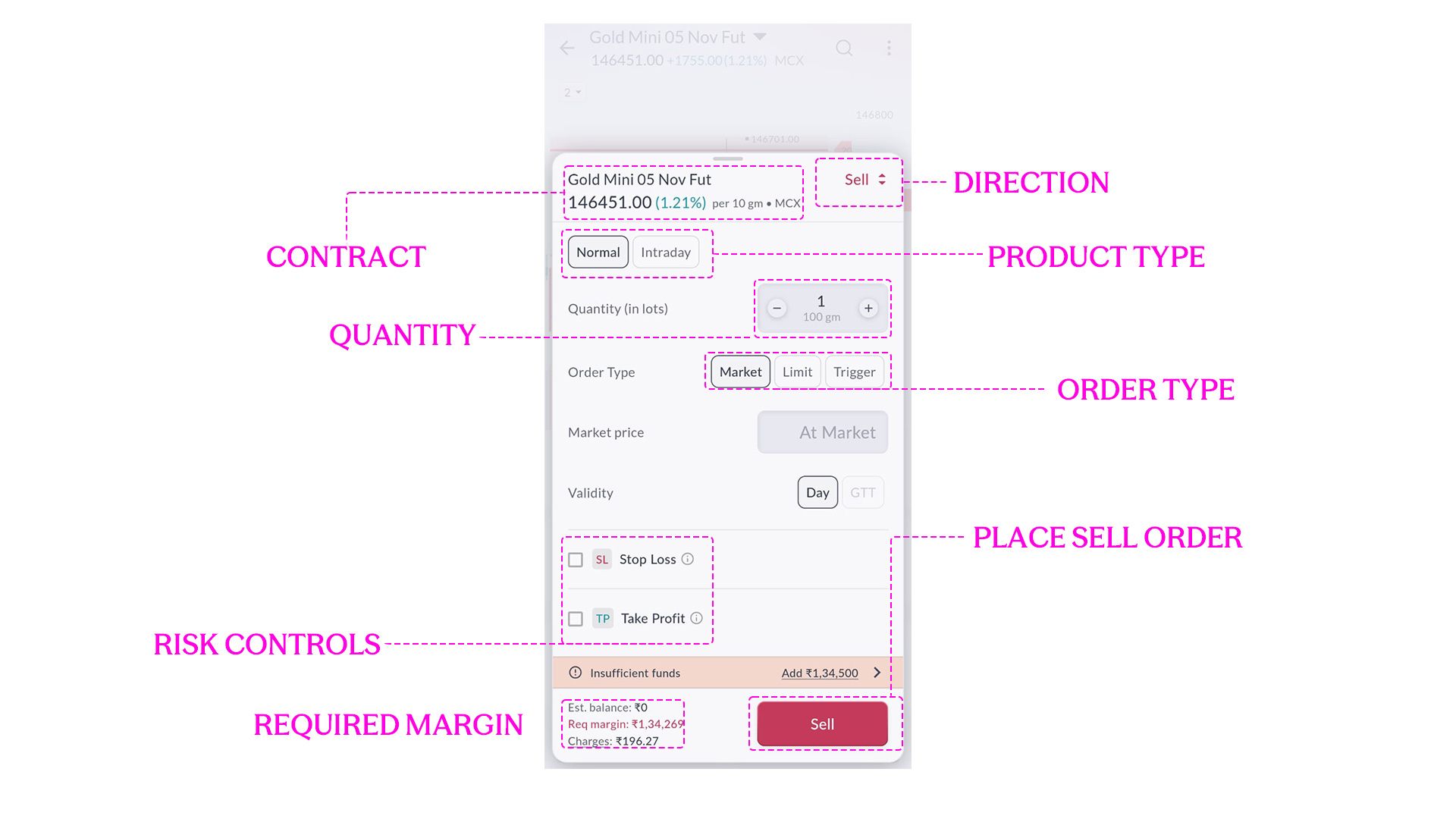
The top of the ticket confirms the instrument and direction:
Contract: Gold Mini 05 Nov Fut
Direction: Sell
The live price in this capture is around ₹1,46,451 per 10 grams.
Below that, the ticket gives you the main execution choices.
Normal Or Intraday
Normal allows the position to remain open beyond the current trading session.
Intraday is meant for a position that will be closed within the session.
On SAHI, open intraday commodity positions are squared off automatically 15 minutes before the market closes.
Choose the one that matches your intended holding period.
Quantity
SAHI asks for quantity in lots and also shows the corresponding weight.
In this example:
1 lot = 100 grams
Check both before placing the order. A wrong lot count can change the size of the position significantly.
Order Type
The ticket gives you three choices:
Market
Limit
Trigger
A Market order attempts to execute immediately at the available market price.
A Limit order lets you specify the price at which you are willing to trade.
A Trigger order waits for a specified trigger level before the order becomes active.
The detailed use of each order type comes in Chapter 18. Here, the basic rule is simpler: choose the order type that matches the trade you are trying to place.
Add The Stop Loss And Take Profit
The Futures ticket also allows you to enable Stop Loss and Take Profit before placing the trade.
If your trade plan already contains those levels, they can be entered here so the risk controls are attached to the order from the beginning.
The stop defines the level at which you want to exit if the trade moves against you.
The Take Profit defines the level at which you want to exit if the trade moves in your favour.
These levels should come from the trade plan. The order screen is where you enter them.

Check The Capital Required
At the bottom of the ticket, SAHI shows the capital requirement and estimated transaction charges.
SAHI charges a flat ₹10 per executed order, which is one part of those estimated charges.
In the supplied screen:
Required margin: approximately ₹1,34,269
Estimated charges: approximately ₹196.27
The account used for the capture has no available balance, so SAHI also shows Insufficient funds.
The exact margin can change, which is why the live number on the ticket should be checked before placing the trade.
Before tapping Sell, confirm:
Correct contract
Correct direction
Correct product type
Correct quantity
Correct order type
Stop Loss and Take Profit, where applicable
Enough funds to place the trade
Then the order is ready to be sent.
What Happens After You Place It?
If the order executes immediately, it appears as an open position.
If it is waiting for a particular price or trigger, it remains pending until the order conditions are met.
Once executed, check the position again:
Which contract was filled?
Was it Buy or Sell?
How many lots were executed?
What was the average execution price?
If Stop Loss and Take Profit were part of the order, confirm that they are also showing correctly.
A Futures position can later be closed by taking the opposite side in the same contract. A Sell position is closed by buying back the required quantity.
Modification, cancellation and active position management come in Chapter 18.
The Faster Route: 1-Tap Trading
SAHI also allows trading directly from the chart using 1-Tap trading.
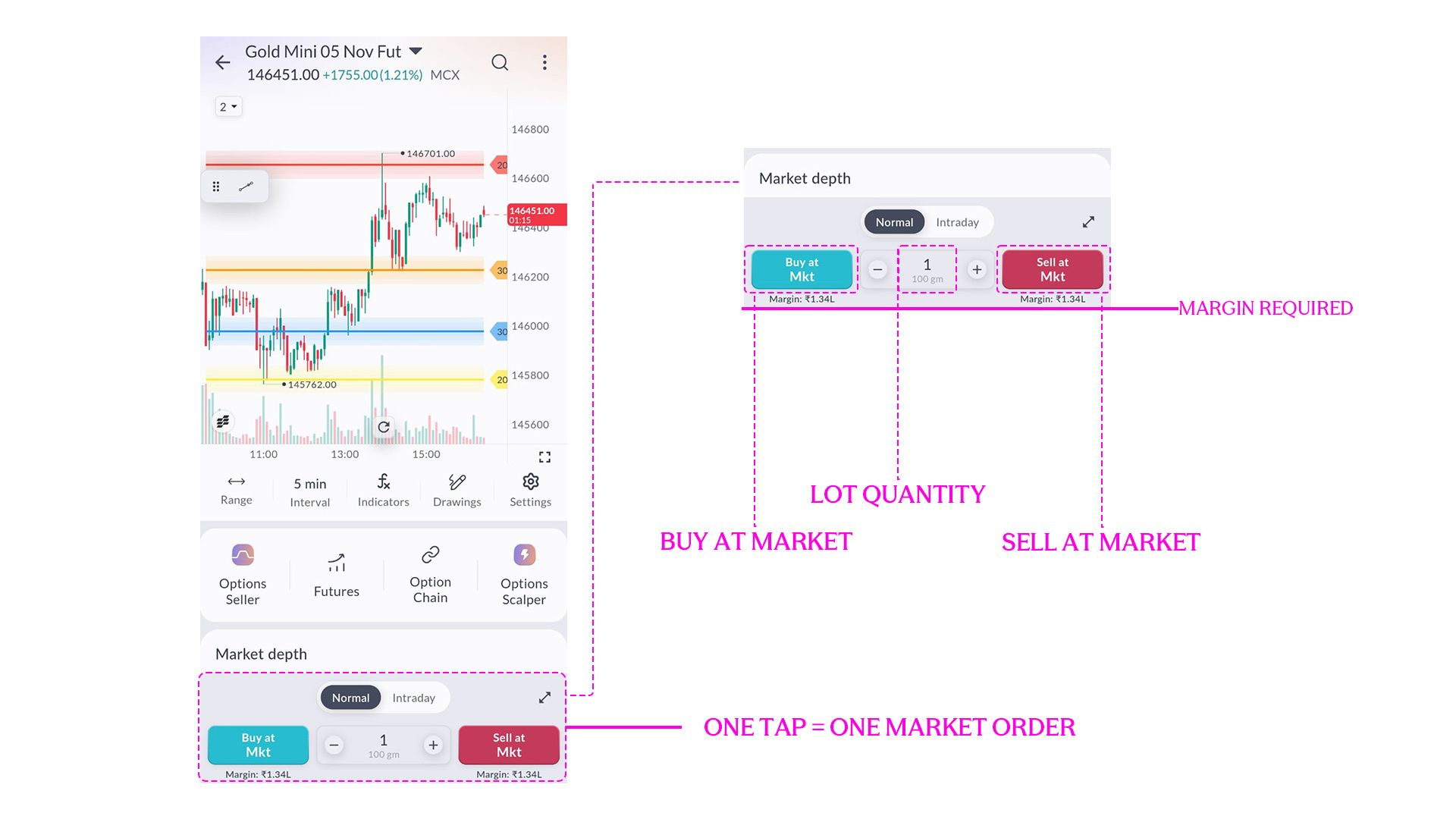
Once enabled, the chart shows:
Buy at Mkt
Selected lot quantity
Sell at Mkt
The margin requirement is also visible below the Buy and Sell buttons.
Tapping Sell at Mkt sends a Market order immediately.
That can make execution faster, but there is less of a pause to recheck the ticket.
Before using 1-Tap, make sure the contract, direction and quantity are already correct.
For someone still learning the execution flow, the full order ticket gives you more room to check each field before placing the trade.
Now Place A Put Trade
Options use a similar order flow, but the contract contains a few more details.
From the Gold Mini screen, open the Option Chain, choose an expiry, select the strike and then choose Call or Put.
The live screen shown here is:
Gold Mini 29 Oct 141500 Put
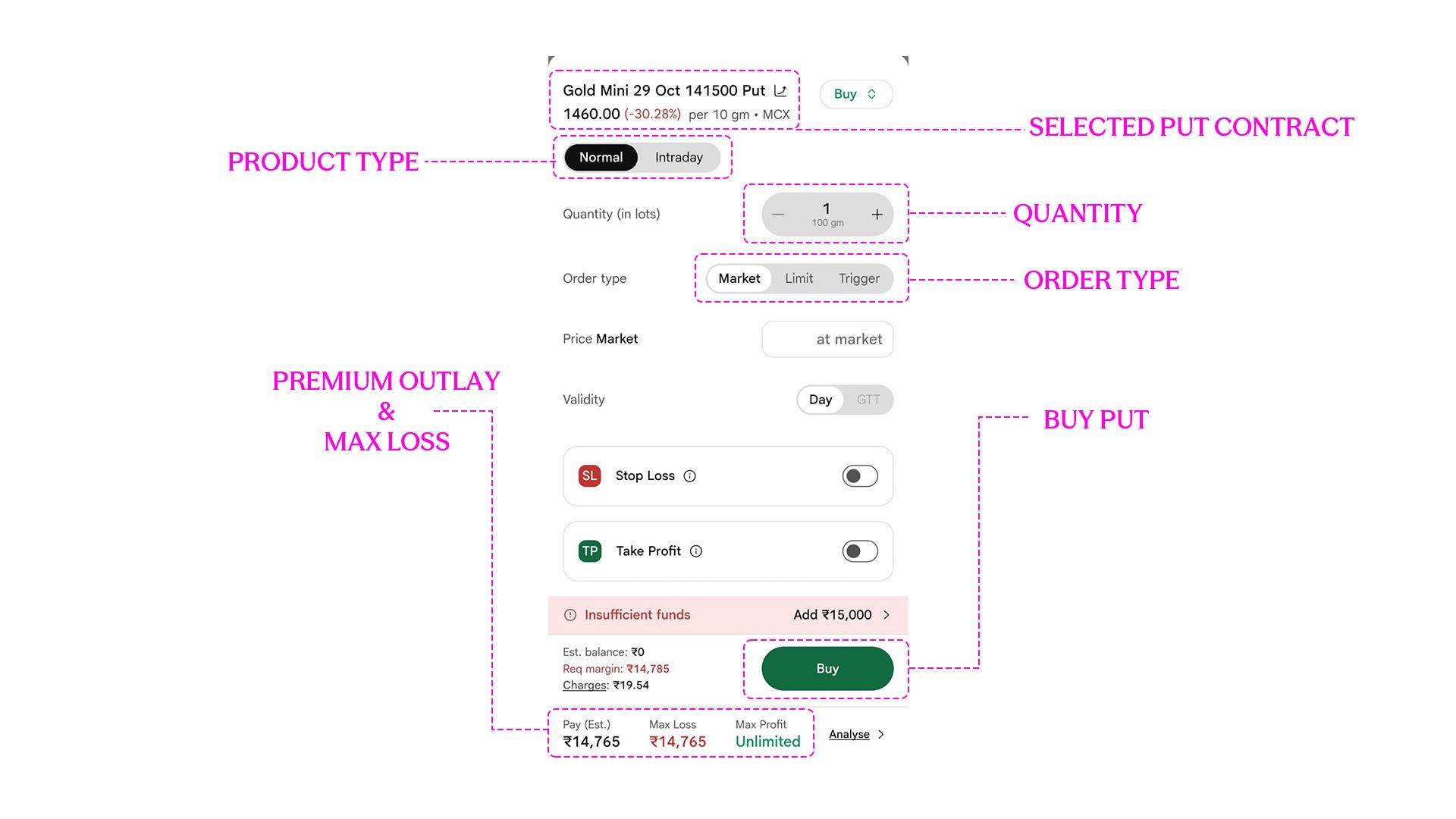
The contract name tells us four things immediately:
Commodity: Gold Mini
Expiry: 29 Oct
Strike: 141500
Option type: Put
The direction on the ticket is Buy.
The screen also shows:
Product: Normal
Quantity: 1 lot / 100 gm
Order types: Market, Limit or Trigger
The live Put premium in this capture is around:
₹1,460 per 10 grams
At the bottom of the ticket, SAHI shows the estimated premium outlay and maximum loss.
In this capture:
Pay (Est.): approximately ₹14,765
Maximum loss: approximately ₹14,765
It also shows:
Required margin: approximately ₹14,785
Estimated charges: approximately ₹19.54
For a purchased Put, check the premium outlay before placing the order and make sure it fits the amount you are prepared to risk.
The screenshot currently has Market selected. If you want to control the maximum premium you are prepared to pay, switch to a Limit order and enter the premium at which you are willing to buy.
Stop Loss And Take Profit On The Put
The Put ticket also allows you to enable Stop Loss and Take Profit.
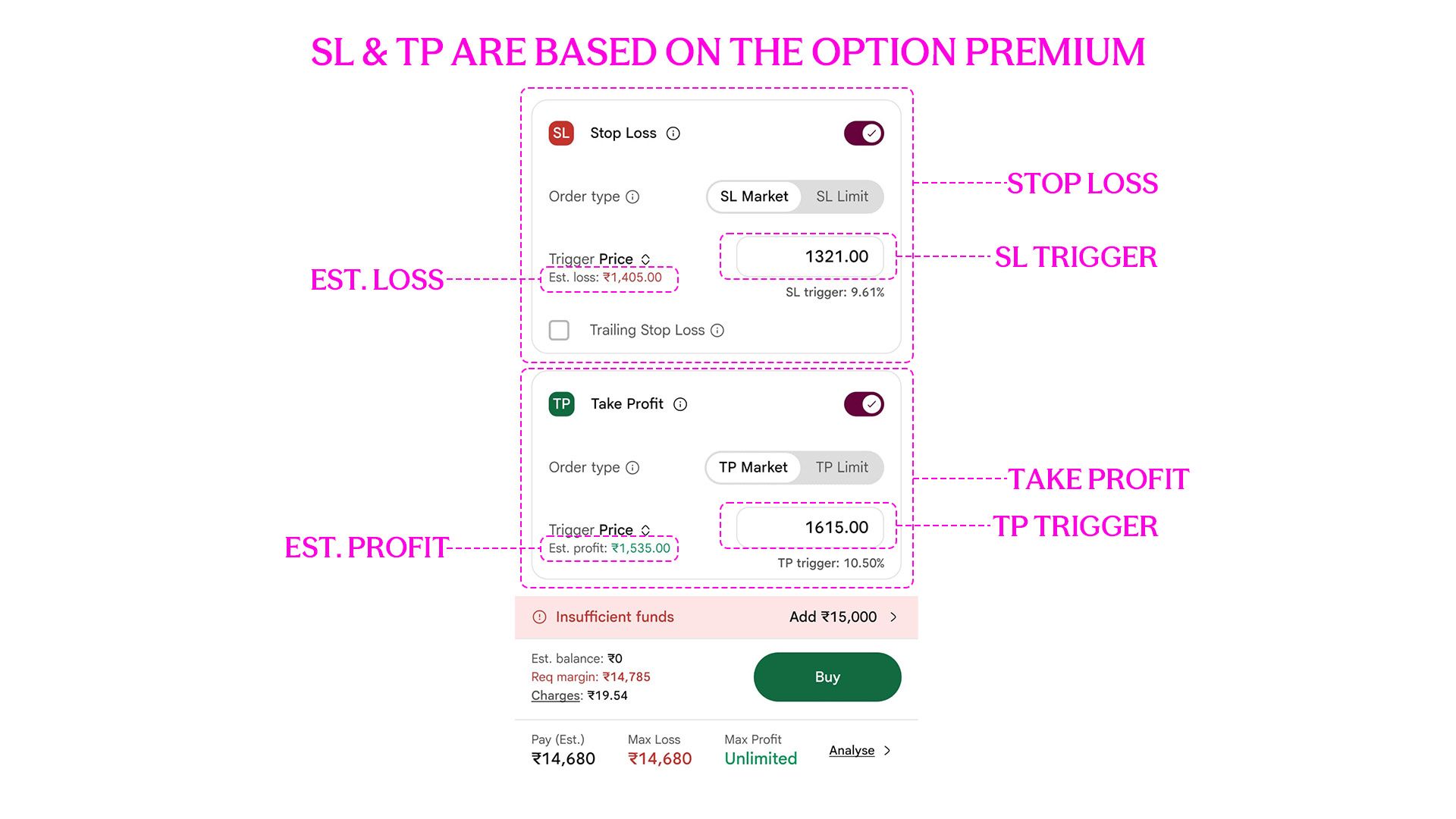
Here, the important difference is that these levels are based on the Option premium.
In the supplied example, the Put premium is around ₹1,460.
The Stop Loss is set at:
Trigger price: ₹1,321
Estimated loss: ₹1,405
The Take Profit is set at:
Trigger price: ₹1,615
Estimated profit: ₹1,535
The two Put screenshots were captured at slightly different live premiums, which is why the estimated premium outlay shown at the bottom also changes slightly.
A stop or target based on the underlying Gold price cannot simply be copied into these fields. If you want to use premium-based exits, the Stop Loss and Take Profit need to be defined using the Option premium.
You can also continue monitoring the underlying Gold chart and close the Put manually if the market view changes.
Before tapping Buy, confirm:
Correct expiry
Correct strike
Put, not Call
Buy
Correct quantity
Order type
Premium outlay
Stop Loss and Take Profit, where applicable
Once those checks are complete, the Option order can be placed. If it fills, the Put will appear as an open position.
From there, execution gives way to trade management. How do you modify an order? What if the position moves sharply? How do you cancel a pending order or exit an open trade?
That is where Chapter 18 begins.
Why margin, lot size and premium decide the capital needed is covered in How Much Capital Do You Need to Trade Commodities?.
Key Takeaways
- Check the contract, direction, quantity and order type before placing any commodity order.
- The live ticket shows the actual margin or premium outlay required at the time of execution.
- Stop Loss and Take Profit can be added from the order ticket when those levels are already part of the trade plan.
- A Put ticket works with the Option premium, so its Stop Loss and Take Profit levels are premium levels.
- 1-Tap trading makes execution faster, but the trade details should already be clear before using it.
Test yourself
Five quick questions on Chapter 17: Placing Commodity Trades on Sahi
Commodity knowledge check
How well do you understand commodity markets?
Answer all five questions to check what you have picked up from this chapter. Each answer comes with a short explanation.
 5 questionsUnder 3 minutes
 Instant score