

How to Trade with Discipline on Sahi: Auto SL/TP, Trailing Stop, P&L Protect & Kill Switch
6 min read
Published 23 Jul 2026, 05:30 PM ISTUpdated Fri, 24 Jul, 2026, 01:31 PM IST

Summary
Sahi gives traders multiple built-in guardrails to trade with discipline. Set Auto SL/TP defaults so every trade carries a stop and target from the start. Add a Trailing Stop Loss to lock in profit as price runs. Turn on P&L Protect to cap the whole day's loss or book a target across all positions. Keep the Kill Switch ready to force a full exit when emotions take over. Used together, they turn discipline into a setting, not a decision made under pressure.
Trade Smarter, Not Harder
Receive market breakouts, AI insights, and trading strategies directly in your inbox.
Most experienced traders already know their edge is not a secret indicator. It is discipline. Cutting losers fast, letting winners run, and walking away on a bad day. The hard part is doing that in real time, when a position is not moving in your favour and the mind is looking for reasons to hold on.
In such moments, SAHI handles this by moving discipline out of the moment and into the settings. Four features work as layers of defence, from the single trade all the way up to the full trading day. Here is how a disciplined trader can stack them.
Layer 1: Set your SL and TP before you enter
The first rule of risk control is simple. No position without a stop. SAHI's Auto SL/TP defaults make this automatic, so the trader never enters a 'naked' trade again.
Inside Scalper, open the three-dot menu at the top right and select Order Defaults. Go to the SL/TP section and turn on auto stop loss and auto take profit. Choose either a percentage or a fixed number of points for each. Tap Apply. From then on, every 1-tap buy or sell places the stop loss and target at those default levels for you.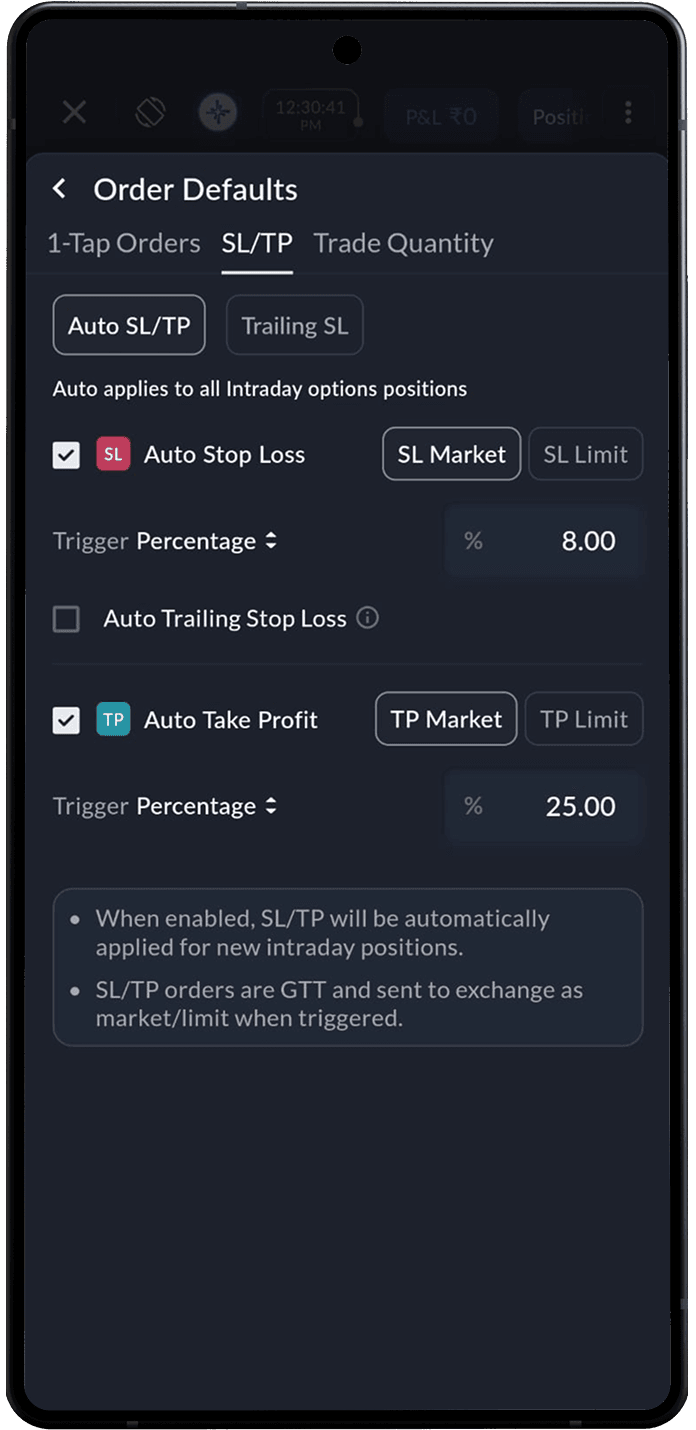
Two details matter here. SL and TP are linked orders. When one triggers and fills, the other cancels on its own, so a single position can never exit twice. And on SAHI both can be placed as either Market or Limit orders across equities, futures and options, so the trader controls the trade-off between certainty of exit and price. A trader can also drag the SL and TP lines directly on the chart to fine-tune any open position.
The payoff is consistency. Risk per trade stops being a decision made in the heat of a fast market. It becomes a fixed rule the platform applies for you.
Layer 2: Lock in profit with a Trailing Stop Loss
A fixed stop protects the downside. It does nothing to protect a profit that is already on the screen. That is the job of the Trailing Stop Loss (TSL).
A TSL is a dynamic stop. It moves in the direction of the trade and keeps a set distance behind the price. It never moves against the position. On SAHI's Scalper the trail is set as a value in points, and it can be applied straight from the chart at market or limit to reduce slippage. You can set it from the same Order Defaults section.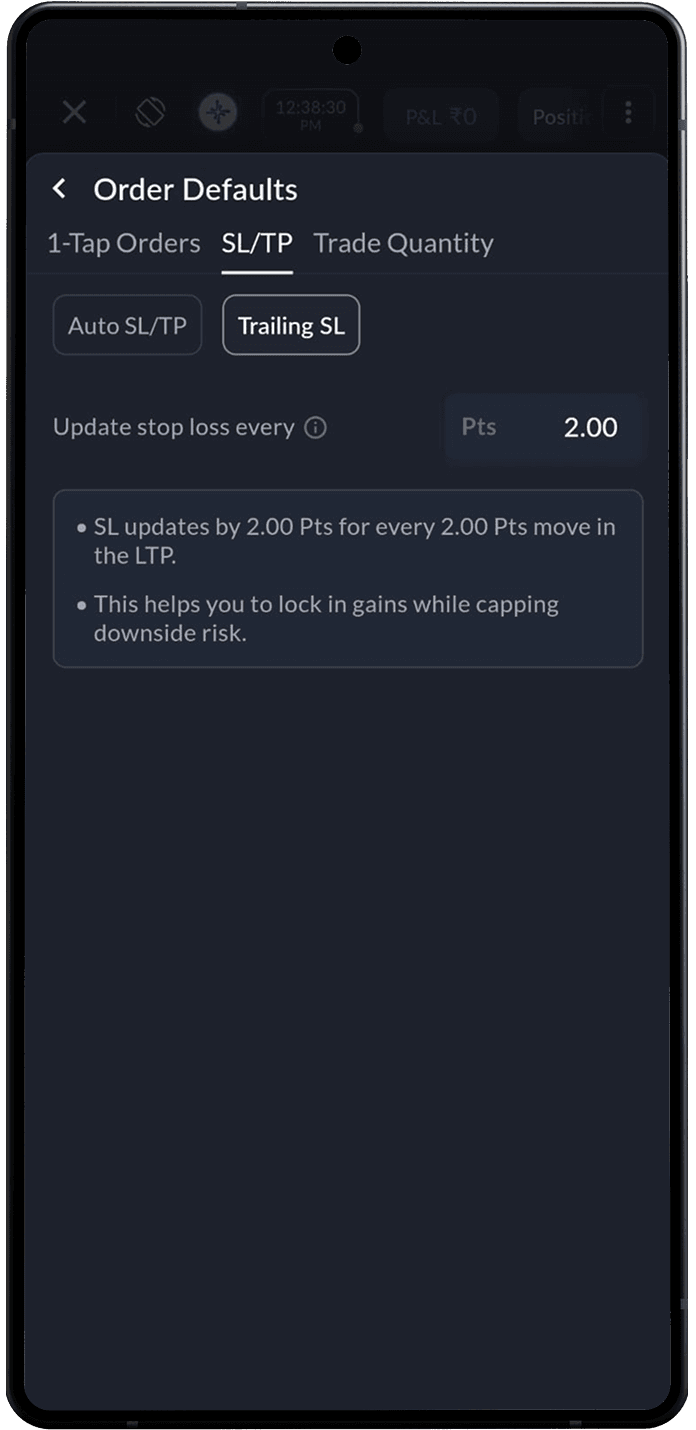
An example makes it clear. A trader buys at ₹100 and sets a ₹10 TSL. As price climbs to ₹130, the stop trails up to ₹120. If the price then falls back to ₹120, the TSL triggers and the trade exits near ₹120, banking a ₹20 profit. Had the price kept rising, the stop would have kept climbing with it.
This solves the most common discipline failure of all: giving back a good profit because of hope. The trailing stop books the gain automatically while still leaving room for the trend to continue.
Layer 3: Cap the whole day with P&L Protect
Per-trade stops are not enough on a rough day. A trader can hit their stop, re-enter, hit it again, and bleed the account one "revenge trade" at a time. P&L Protect sits above every position and watches the total.
P&L Protect automatically squares off all open positions and cancels open orders when total positions' P&L hits a pre-set P&L Stop or profit target. The trader sets a maximum loss for the day, a profit goal, or both. Once either level is reached, SAHI closes everything with market orders. No manual clicking required.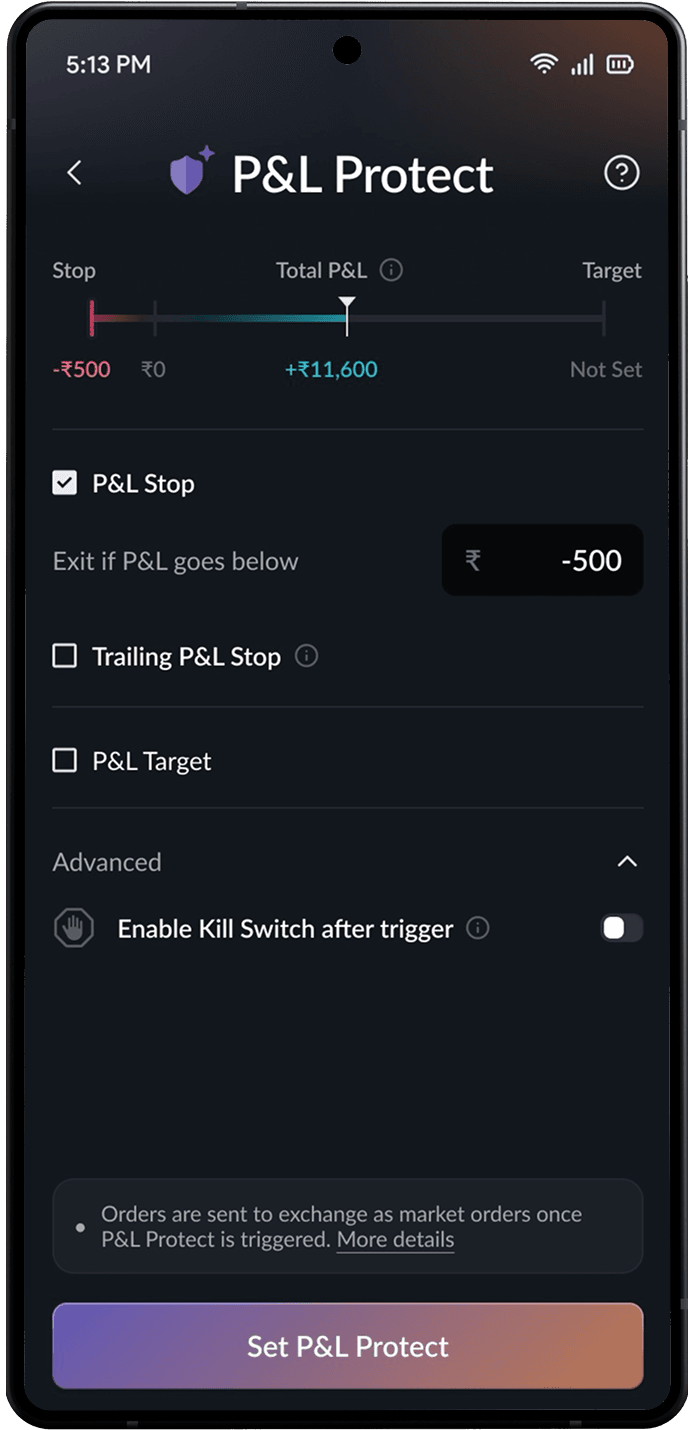
It also trails. With Trailing P&L Stop switched on, the stop floor rises as the day's profit grows. Set a P&L Stop at −500 with trailing on. If total P&L climbs to, let's say, 15,000, the stop moves up to 1,500, always holding a 500 buffer below the peak. A reversal then exits the day at a target of around 18,000 in profit instead of the original −500. The floor only ever moves up, never down.
Activating it takes under ten seconds. On the Positions page, tap Set P&L Protect, agree to the disclaimer, and set the Stop, target, or both. It can also be reached through Profile under Traders Control. One point to note: P&L Protect is session-based and must be set fresh each trading day. Yesterday's settings do not carry over.
Layer 4: Enforce the hard stop with the Kill Switch
Sometimes the right move is to stop trading entirely. The Kill Switch is the final layer, built for exactly that moment.
Activate it and SAHI instantly exits every open position. All open orders are cancelled, and all positions are squared off via market orders. It then blocks equity intraday and F&O trading until 11:59 PM that day, or you can also close between 30 mins and 1 to 3 hrs. Once done, there is no way back in until the market day resets, or the time passes, which is the entire point.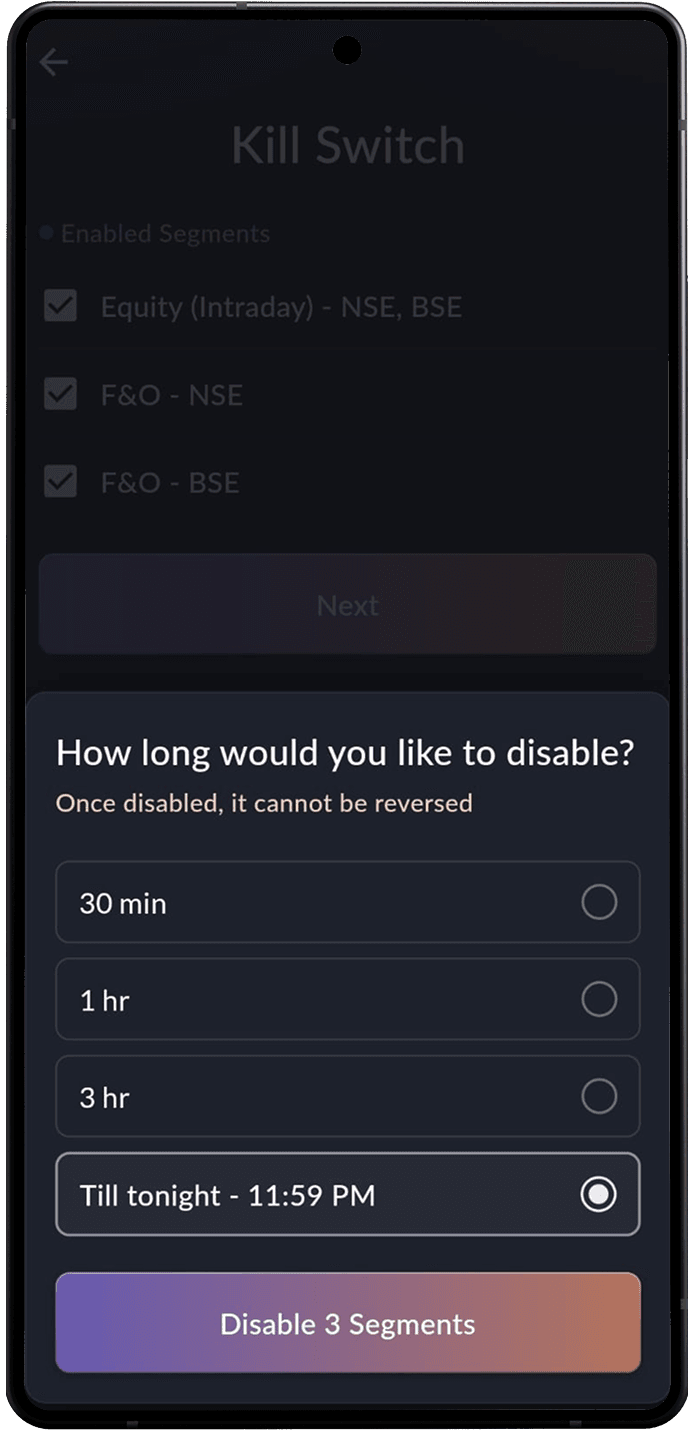
The Kill Switch can also be used on its own as a one-tap block on a segment, found under Profile → Kill Switch. Many traders arm it before the session even starts, as a pre-commitment against the version of themselves that shows up after two bad trades.
It pairs naturally with P&L Protect. Depending on the trader's settings, the Kill Switch can engage after a P&L Protect trigger, so hitting the daily loss cap does not just close positions but locks the account for the rest of the day too.
Tracking your overall performance
The four guardrails handle discipline in the moment. But real consistency is built after the market closes, when a trader sits back and looks at the pattern across days and weeks. That is where SAHI's P&L Calendar comes in. It lays out your daily profit and loss on a month-view calendar, each day colour-coded by outcome, so a glance tells you whether the month is trending green or bleeding red. No spreadsheet to maintain, no manual logging. 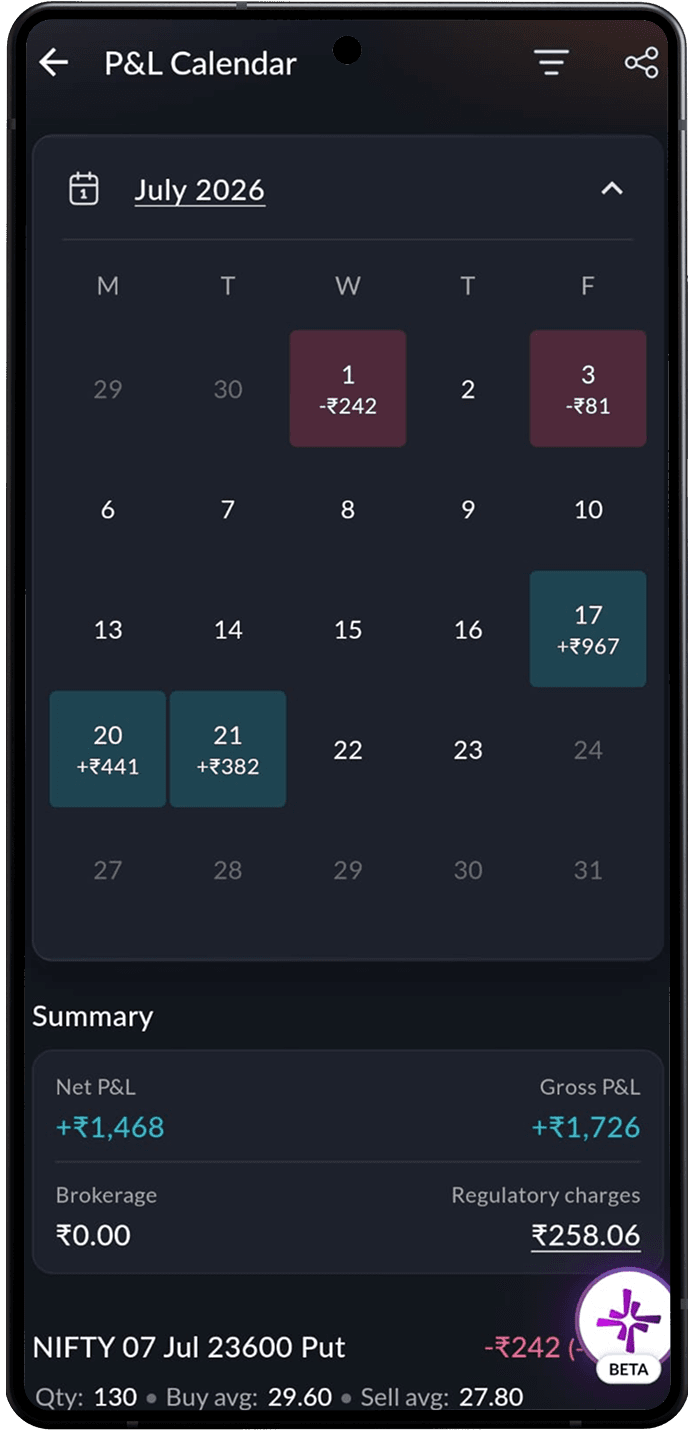
What makes the calendar a discipline tool rather than just a scoreboard is what it reveals over time. You can identify clusters of red on particular weekdays, the days a loss cap was hit, and more. Patterns that are invisible trade-by-trade become obvious when the whole month is laid out at once. Pair it with the guardrails above and the loop closes.
How the four layers work together
Each feature guards a different level of risk. Together they cover the full day.
| Feature | What it protects | Discipline it enforces |
|---|---|---|
| Auto SL/TP defaults | The single trade | Never trade without a stop and target |
| Trailing Stop Loss | An open profit | Let winners run, but bank the gain |
| P&L Protect | The full book of positions | Respect a daily loss limit and profit goal |
| Kill Switch | The trader's own behaviour | Walk away when the day is done |
A disciplined session on SAHI looks like this. Auto SL/TP defaults are set once, so every entry is protected. A trailing stop rides each winner. P&L Protect holds a firm loss cap and a target for the whole day. And the Kill Switch waits in reserve for the moment discipline needs to be enforced, not merely intended.
That is what separates consistent traders from the rest, and SAHI's trading platform is built to make it the default.
FAQs
P&L Protect automatically squares off all your open positions and cancels open orders when your total positions P&L hits a pre-set P&L Stop or profit target. It works across your whole book, not a single trade, and is session-based, so it must be set fresh each trading day.
Related blogs
Related blogs

Recent blogs

Jio Platforms IPO: Everything Investors Need to Know Before Investing
/Posted 2 weeks ago
Anchored VWAP is Now Live on SAHI Charts
/Posted 1 month ago
Add Sahi as a Preferred Source on Google
Click the link, confirm the box next to sahi.com is checked — ignore any other results.